Creative Fusion: A Versatile Sans Serif for Handmade Products and Printables
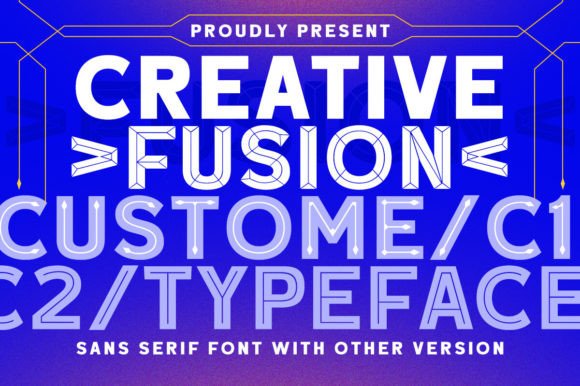
If you design and sell physical products, you know that choosing the right typeface can make or break a project. The difference between a font that feels generic and one that elevates your work often comes down to small details—the curve of a letter, the weight of a stroke, or an unexpected inline detail that catches the eye. Creative Fusion delivers exactly that kind of thoughtful design. As a custom sans serif typeface with six inline style options built into a single font file, this is a tool that lets you shift between looks without buying or installing multiple fonts. For a crafter or small shop owner, that kind of flexibility saves time, money, and creative energy.
This font is neither a simple sans serif nor a decorative display font that works only for large headings. It sits somewhere between, offering clean structure with added personality through those inline accents. Whether you are designing candle labels, creating birthday invitations, or producing seasonal wall art for your Etsy shop, Creative Fusion gives you room to play without sacrificing readability. It handles short phrases beautifully, and it holds its own on product packaging, stickers, and signage where you need the text to be seen and understood quickly.
What Makes Creative Fusion Stand Out for Crafters
At its core, Creative Fusion is a sans serif typeface with a modern, approachable feel. The letters are clean and well-proportioned, so they work well for both display and smaller text. What makes this font different from many other sans serif options is the inclusion of six inline styles. These are not separate fonts but variations within one font file, which means you can switch between a solid look, a hollow inline, a double-line inline, and other treatments without leaving your design software. For anyone who works in Cricut Design Space, Silhouette Studio, or Adobe Illustrator, this is a real workflow advantage.
I use fonts for everything from product labels to printed templates, and I have found that Creative Fusion’s inline styles add a handcrafted feel to even the simplest designs. For example, a single word like handmade or farmhouse set in the inline style looks like a custom die-cut piece. It adds depth and texture to stickers, wood signs, and paper goods without requiring additional design elements. The font also includes lowercase and uppercase options, numerals, and punctuation, which makes it practical for real product use.
For crafters who sell printables or SVG templates, Creative Fusion is a strong choice because the inline styles are vector-friendly and cut cleanly on machines. I have tested it on small labels and larger wall art, and the letterforms remain crisp even when scaled down. The font’s x-height is generous, so words stay legible at smaller sizes, which is crucial for product tags and sticker sheets where space is limited.
Using Creative Fusion for Product Labels and Packaging
Product labels are one of the most detail-intensive areas where typography matters. A label needs to look professional, communicate the product name or scent clearly, and fit within the overall brand identity. With Creative Fusion, I have found that the solid weight works well for the primary product name, while one of the inline styles can be used for a secondary line like hand poured or small batch. The contrast between the solid and inline treatments creates visual interest without clashing.
For candle labels, soap wraps, and jar tags, the font’s clean sans serif structure keeps the text easy to read at a glance. The inline styles add a decorative touch that feels contemporary without being fussy. If you sell beauty products or bath and body items, Creative Fusion can give your packaging a polished, boutique look that customers associate with quality. I have used it on lip balm labels and lotion bottles, and the font prints well on kraft paper and glossy sticker stock alike.
Food product packaging is another area where Creative Fusion excels. Whether you are labeling jam jars, spice blends, or tea tins, the font’s versatility means you can use one style for the product name and another for the flavor or variety. A honey label set in the inline style with a simple script for the word wildflower creates a balanced, appealing composition. The font does not distract from the product itself, but it does elevate the presentation in a way that plain system fonts cannot.
Invitations, Greeting Cards, and Wedding Stationery
If you design invitations or greeting cards, Creative Fusion offers several advantages. The inline styles give you built-in decorative elements that mimic the look of layered cardstock or foil stamping. You can use the solid style for the main names or event details and the inline style for a headline like you are invited or celebrate with us. This saves you from having to create separate cut files or overlapping text layers in your design software.
For wedding stationery, Creative Fusion works especially well for welcome signs, seating charts, and ceremony programs. The font’s modern sans serif character pairs nicely with script fonts for the couple’s names. I have used it with handwritten-style scripts for a relaxed, romantic look, and with bolder scripts for a more dramatic feel. The font’s flexibility means you can create an entire invitation suite with just Creative Fusion and one other typeface, which keeps your design cohesive and reduces file complexity.
Birthday and holiday cards are another natural use. Because Creative Fusion offers six different inline styles, you can match the font treatment to the occasion. A Christmas card might use the thicker inline style for joy or noel, while a birthday card could use the lighter inline for a more playful tone. For printable card makers, this font is a solid addition to your design assets because it gives you multiple looks without multiple purchases.
Wall Art, Signs, and Home Decor
Creative Fusion really shines in home decor projects. For farmhouse-style signs, the inline styles create the look of layered paint or routed wood without extra work. A sign reading gather or welcome set in one of the inline styles feels dimensional and intentional. The font works well on wood, acrylic, and canvas, making it suitable for both printed wall art and physical cut signs.
For SVG designers, the inline styles are a gift. When you create cut files for Cricut or Silhouette, having a font that includes these built-in treatments means you can offer customers a wider variety of designs without increasing your production time. I have created SVG bundles using Creative Fusion for phrases like this is our happy place and live simply, and the font cuts cleanly with minimal weeding. The letterforms are not overly intricate, which makes them practical for machine cutting.
Printable wall art also benefits from this typeface. Because the inline styles add visual interest, you do not need as many graphic elements to fill the space. A single word in Creative Fusion centered on a textured background looks complete and polished. The font is available in a range of styles, so you can offer your customers multiple design variations of the same print without creating entirely new files.
Font Pairing Ideas for Creative Fusion
Pairing Creative Fusion with other typefaces expands its usefulness. Because it is a sans serif with a clean, friendly feel, it works well with script or handwritten fonts for contrast. I have paired it with a casual handwritten font for product labels, using the script for the brand name and Creative Fusion for the product description. The combination feels personal but not messy.
For more formal designs like wedding stationery, pairing Creative Fusion with a refined serif font creates a balanced contrast between modern and classic. The serif font can carry longer text like ceremony details, while Creative Fusion handles headings and names. This approach keeps the design elegant and readable.
If you are designing for a brand identity, Creative Fusion works as a display font for logos and taglines, paired with a simple sans serif font for body text. The inline styles give you a distinctive logo look without requiring custom lettering. For small shop owners who need cohesive branding across labels, tags, social media graphics, and packaging, this font pairing strategy helps maintain visual consistency without relying on multiple decorative fonts.
Practical Readability and Production Notes
When using Creative Fusion for physical products, there are a few practical points to keep in mind. For small stickers and labels under two inches wide, the inline styles may need to be tested at your actual print size. The hollow treatments can become thin when reduced, so check your proofs before sending to print. For most projects, Creative Fusion holds up well at sizes above 12 points, and the solid style remains readable even at smaller sizes.
For cutting machines, I recommend testing each inline style on a scrap piece of vinyl or cardstock before cutting your final project. The thicker inline styles cut cleanly on standard settings, while the thinner ones may benefit from adjusting blade pressure or using a lighter-weight material. The font’s vector structure is sound, so once you find the right setting for your machine, you can reuse that setup for all similar projects.
Creative Fusion includes multiple file formats, which is a practical consideration for crafters who work across different platforms. The font installs easily on both Mac and Windows, and it is compatible with most design software including Adobe Suite, Canva, Affinity, and Cricut Design Space. The multilingual support is also a plus if you sell products for international customers or create bilingual packaging.
Commercial Licensing and Selling Your Products
If you sell physical products, templates, printables, or digital downloads, you need to pay attention to font licensing. Creative Fusion is a premium font, and it is important to check whether your intended use—whether selling printed items on Etsy, offering SVG templates, or creating client work—is covered under the standard license or if you need an extended license. Many font designers offer tiered licensing for small businesses, and being transparent with your customers about the fonts you use builds trust.
For crafters who produce handmade goods in small batches, a standard commercial license typically covers selling physical products like candles, soaps, and shirts. If you create digital products such as editable templates or SVGs that include the font, you may need a license that allows embedding or sublicensing. Always read the licensing terms provided with Creative Fusion to ensure your shop stays compliant. This small step protects your business and supports the font designer whose work helps you create better products.
Creative Fusion is a practical, versatile sans serif typeface that earns its place in any crafter’s toolkit. With six inline styles in one font, it offers the flexibility to create diverse designs without extra cost or clutter. Whether you are labeling products, designing invitations, or creating cut files for your shop, this font helps you work smarter and produce results that customers notice.